One app, one deploy: running a CMS inside Next.js
Payload 3 runs inside this site's Next.js app: one codebase, one deploy. What that buys, and the four times it bit me.
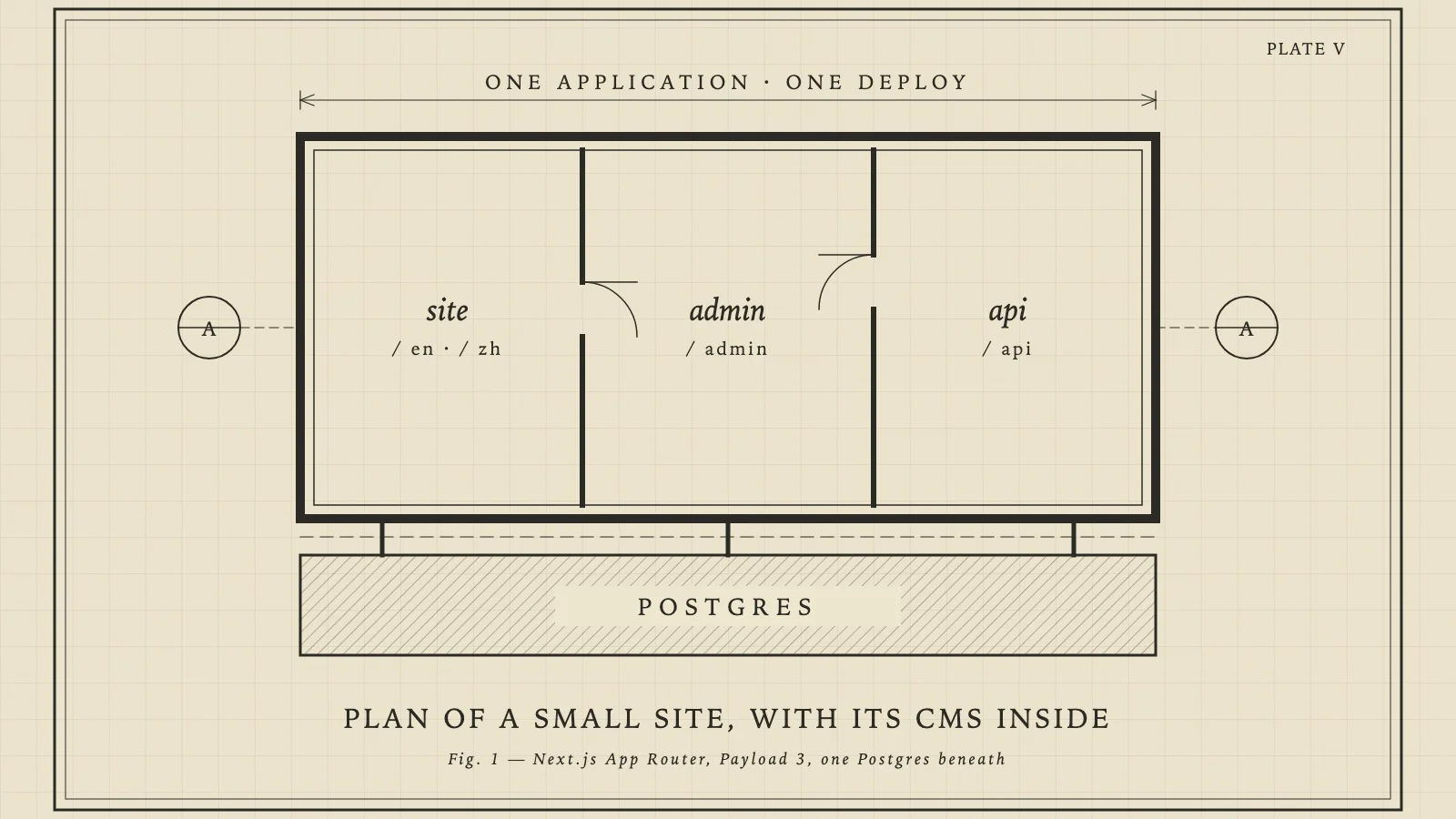
This site is one Next.js application. The pages you read, the admin I write in and the API behind both are a single codebase and a single Vercel deployment. The CMS is Payload 3, and it doesn't run beside the site. It runs inside it, mounted under /admin in the same App Router. The data lives in Postgres on Supabase, and Supabase is used as Postgres and nothing else.
This post covers what that arrangement got me, and the four times it bit me. Each of them has a pull request in the public repository, so none of this is reconstructed from memory.
What one app buys
Queries are function calls. A page that needs posts asks Payload's Local API, in the same process, with no HTTP hop and no API client to keep in sync:
const { docs } = await payload.find({
  collection: 'blogs',
  where: { slug: { equals: slug }, status: { equals: 'published' } },
  depth: 1,
  limit: 1,
  locale: asLocale(locale),
})
Types come straight from the schema. Each collection is defined in TypeScript, and Payload generates payload-types.ts from those definitions. When I rename a field, the pages that read it stop compiling. In a split setup that mistake shows up as an empty field in production.
And there's one deploy. There is no second service to version, no CORS, and no question of which side was released first. A schema change ships with the code that uses it, and CI checks that the migrations build exactly the schema the code defines.
That is the whole case. The rest of this post is the price.
Trap 1: the Local API skips access control
Over HTTP, Payload enforces each collection's access rules: anonymous visitors can't read drafts. The Local API skips those rules by default, because it assumes the caller is trusted server code. Every query a public page makes is therefore responsible for its own filtering.
I knew that and still got it wrong once. The post page filtered on status: 'published', but the function that builds the page's metadata didn't. A draft's URL returned 404 as it should, yet Next still put the metadata into the 404 response's payload, so guessing a draft's slug got you its title, excerpt and cover image. I confirmed it in production while a new post was waiting as a draft.
The fix was one line. What stayed was a regression check: the CI seed now creates a draft, and the smoke test asserts that its URL returns 404 in both languages with no trace of its title. Pointed at the old build, the check fails.
Trap 2: a query without a locale falls back silently
Payload stores localized fields per locale, and this site's default locale is Chinese. A payload.find() without a locale doesn't fail. It returns the default locale. An English page that forgot the argument rendered Chinese text, and nothing in the build or the type system objected.
That happened three times, in three different places. After the third, I stopped trusting myself to remember it, and the project's working notes now list it first among the known traps. It's still a convention rather than something the compiler enforces, and I would change that if I started again.
Trap 3: dev never renders statically
The first four posts went live and every post URL returned 500. The cause was the locale layout: it asked next-intl for messages without saying which locale, so next-intl read the request headers to work it out. Reading headers is a dynamic API, and calling one during static rendering throws.
Two things had hidden it. The post route was the only statically rendered route under that layout, and there had been no posts, so it had never rendered in production. And next dev doesn't do static rendering at all: the same posts returned 200 locally a few minutes earlier.
The fix was setRequestLocale(locale) in the layout. It has to be the layout, because the layout renders first; I tried the page first, and that didn't work. Since then, any change to a rendering path is verified with next build && next start, never with the dev server.
A related one: the home page had revalidate = 3600 and still rendered on every request. The layout didn't declare its [locale] values with generateStaticParams, so Next treated every page under it as dynamic. One function in the layout turned the home page, the project list and the tool pages from on-demand renders into cache hits.
Trap 4: a loading skeleton turned 404s into 200s
I added loading.tsx skeletons to three list pages. Some time later I found that made-up URLs like /blog/no-such-post returned HTTP 200 with the 404 page in the body.
loading.tsx wraps its whole subtree in a Suspense boundary, and the detail routes sat inside it. Once a response starts streaming, its status code is sent with the first chunk, long before the page reaches notFound(). Finding it took a lot of elimination: in the end I copied the post page word for word into another directory, and the copy returned 404. The only difference was the loading.tsx beside the original.
The list pages and their skeletons moved into a (list) route group. Route groups don't change URLs, and the boundary no longer covers the detail pages.
When the cache expires
Every public page is statically generated and refreshed at most hourly. That is cheap and fast, and it's wrong for up to an hour after every edit. So collection hooks expire the caches as soon as a visible change is saved:
// src/lib/revalidate.ts, trimmed
export function revalidateSite(reason: string): boolean {
  try {
    revalidatePath('/', 'layout')        // every page
    revalidatePath('/sitemap.xml')       // named on its own; see below
    revalidateTag(CACHE_TAGS.sidebar, { expire: 0 })
    revalidateTag(CACHE_TAGS.search, { expire: 0 })
    return true
  } catch (err) {
    console.warn(`[revalidate] skipped after ${reason}`)
    return false
  }
}
It expires the whole site rather than working out which pages a change touches. The site is a few dozen pages, each rebuilt on its next visit, and any list of the affected pages (the home page, the sidebar on every post, the sitemap, search) eventually misses one.
Two details only showed up in production. Locally, the layout path also expired the sitemap; on Vercel it didn't, so the sitemap is named on its own. And scripts that write to the database run outside Next, where there's no cache to reach, so they finish by calling a small authenticated endpoint that runs the same function.
Would I do it again?
For a site like this one, yes. One person writes the content and also ships the code, and the main costs are a set of conventions to keep: filter every query, pass the locale every time, verify rendering on a production build.
I would think again if editors and developers were different teams. The admin and the site share a deploy, so a broken CMS change can take the public pages down with it, and the site's release cadence becomes the editors' too. At that point, two services and an API between them start to earn their overhead.
No comments yet
Be the first to leave a comment below.
Leave a comment
Comments are reviewed before appearing. No spam, no selling your email.